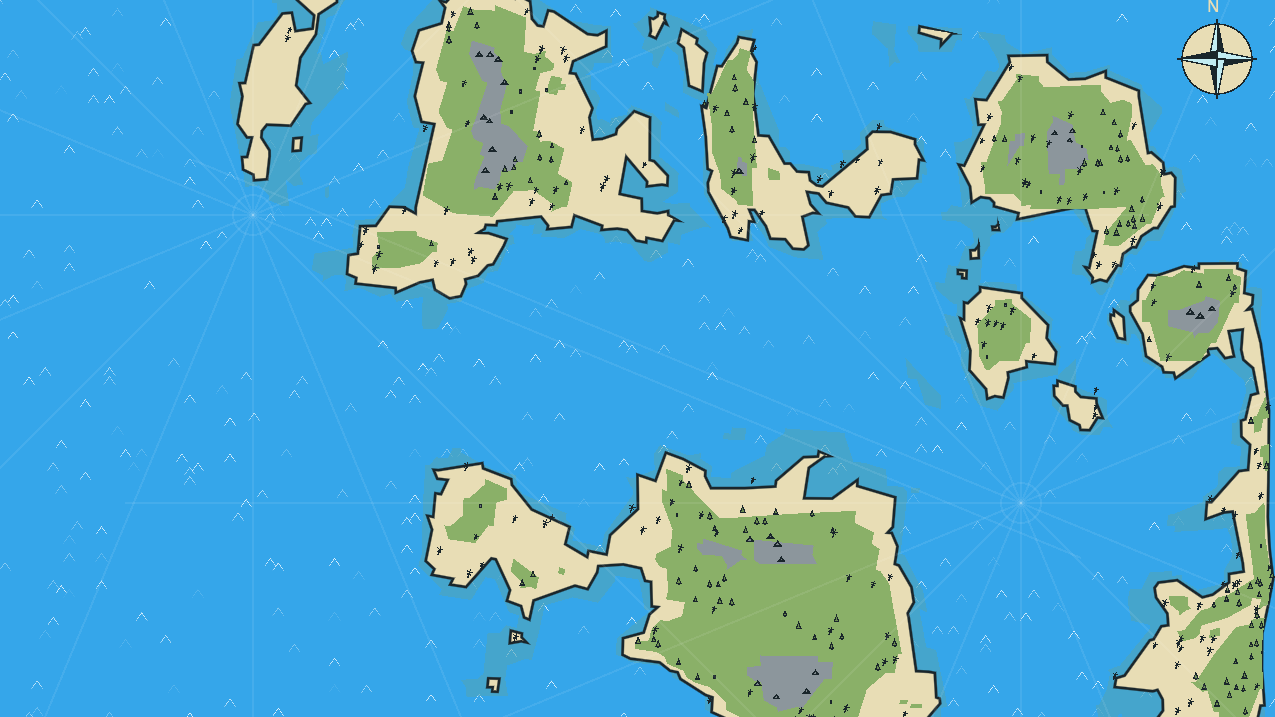
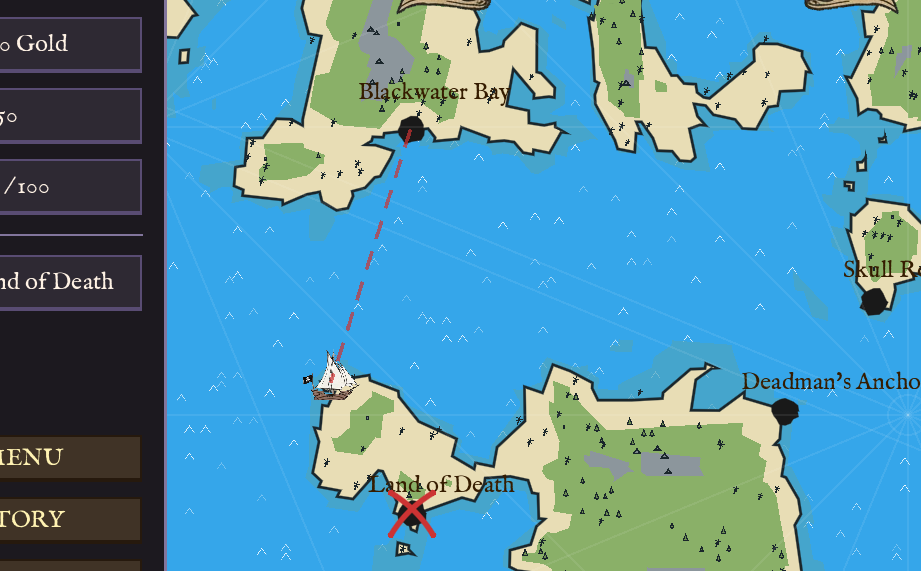
I needed a procedural map for my pirate trading game. The overall logic is to create Islands centered on Marker2D nodes, and stack layers of biomes to achieve some variation. Finally, we will add some props to the scene to make it feel less empty.
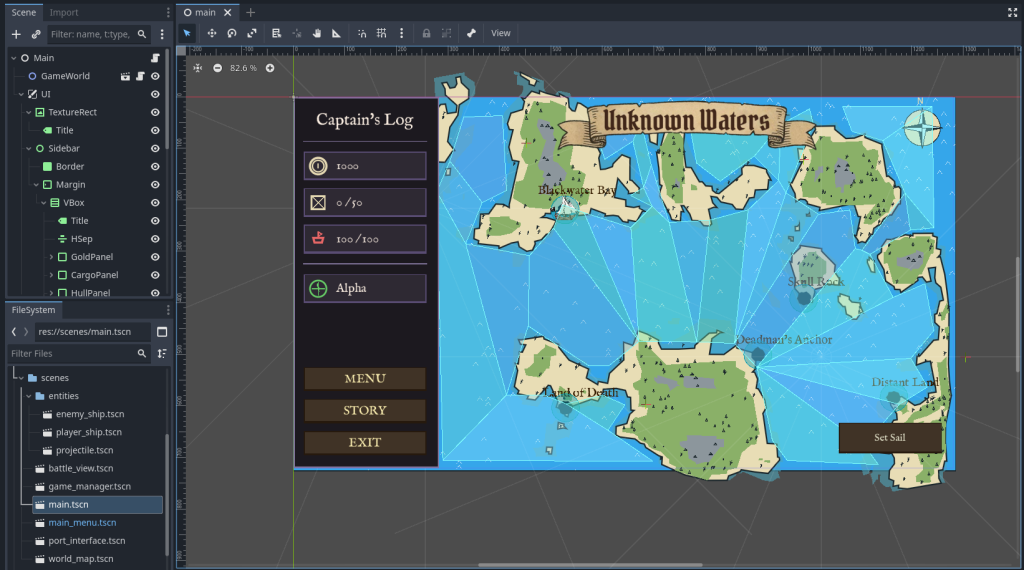
Start by creating a scene, set the root node to Node2D. Add script to the root node.
Copy-paste Boilerplate
Before we start generating terrain, we need the “Editor Tool” logic so the map updates when we change variables or move nodes.
Copy this into your script first.
@tool
extends Node2D

# --- Configuration ---
@export_category("Update")
@export var force_update: bool = false :
    set(value): _request_regen()
@export var auto_update_markers: bool = true

# --- Internal ---
var _noise: FastNoiseLite
var _rng: RandomNumberGenerator

# Editor tracking
var _last_marker_hash: int = 0
var _cooldown: float = 0.0

func _ready():
    _init_noise()
    generate_map()

func _process(delta):
    if not Engine.is_editor_hint(): return

    if auto_update_markers:
        _cooldown -= delta
        if _cooldown <= 0:
            var current_hash = _get_markers_hash()
            if current_hash != _last_marker_hash:
                _last_marker_hash = current_hash
                generate_map()
                _cooldown = 0.2

func _init_noise():
    _noise = FastNoiseLite.new()
    _noise.noise_type = FastNoiseLite.TYPE_SIMPLEX
    _noise.fractal_type = FastNoiseLite.FRACTAL_FBM
    _noise.fractal_octaves = 4
    _rng = RandomNumberGenerator.new()

func _request_regen():
    if is_inside_tree():
        generate_map()

func _get_markers_hash() -> int:
    var children = get_children()
    var h = 0
    var count = 0
    for c in children:
        if c is Marker2D:
            h += c.position.x + c.position.y
            count += 1
    return h + count

func _get_marker_nodes() -> Array:
    var markers = []
    for c in get_children():
        if c is Marker2D:
            markers.append(c)
    return markers

# Placeholder function - we will fill this next
func generate_map():
passIn above code, we made a system to trigger map regeneration. Since in later steps, we will be using Marker2D nodes to position our islands, in boilerplate above, we will just be keeping track of the fact if positions of Marker2D children change.
Making Basic Sand Island
To make an island, we need to calculate the distance from the center to create a “gradient.” The further a point is from the middle, the “lower” it becomes. Then we mix this gradient with the noise. This creates jagged, natural-looking coastlines.
In this gradient, any point “higher” than our Sea Level threshold becomes land.
Add these variables:
@export_category("Map Dimensions")
@export var map_seed: int = 350 :
    set(value): map_seed = value; _request_regen()
@export_range(64, 1024, 1) var map_width: int = 128 :
    set(value): map_width = value; _request_regen()
@export_range(64, 1024, 1) var map_height: int = 72 :
    set(value): map_height = value; _request_regen()
@export_range(4, 32, 1) var resolution: int = 10 :
    set(value): resolution = value; _request_regen()

@export_category("Terrain Thresholds")
@export_range(0.0, 1.0) var sea_level: float = 0.4 :
    set(value): sea_level = value; _request_regen()

@export_category("Pirate Style")
@export var sand_color: Color = Color("e8ddb5")

# Storage for the shape
var _polys_sand: Array = []Update generate_map and add _draw:
func generate_map():
    _noise.seed = map_seed
    _noise.frequency = 0.025
    _polys_sand.clear()

    # 1. Create a BitMap (A grid of true/false)
    var bm_sand = BitMap.new()
    bm_sand.create(Vector2i(map_width, map_height))

    # 2. Fill the data
    for y in range(map_height):
        for x in range(map_width):
            # Distance from center (0.0 to 1.0)
            var d = Vector2(x,y).distance_to(Vector2(map_width/2.0, map_height/2.0))
            var grad = 1.0 - (d / (min(map_width, map_height) * 0.45))
            var mask_val = clamp(grad, 0.0, 1.0)

            var noise_val = (_noise.get_noise_2d(x, y) + 1.0) / 2.0
            var h = noise_val * mask_val

            if h > sea_level:
                bm_sand.set_bit(x, y, true)

    # 3. Convert BitMap to Polygons
    var raw_polys = bm_sand.opaque_to_polygons(Rect2i(0, 0, map_width, map_height), 1.0)

    # Scale them up by resolution
    for r in raw_polys:
        var scaled = PackedVector2Array()
        for p in r: scaled.append(p * resolution)
        _polys_sand.append(scaled)

    queue_redraw()

func _draw():
    for p in _polys_sand:
draw_colored_polygon(p, sand_color)in above code, we use BitMap, while allows us to set grid cells to be either true (for island) or false (for sea). The grad variable is for the radial gradient. This creates a value that is 1.0 at the center and 0.0 at the edges.
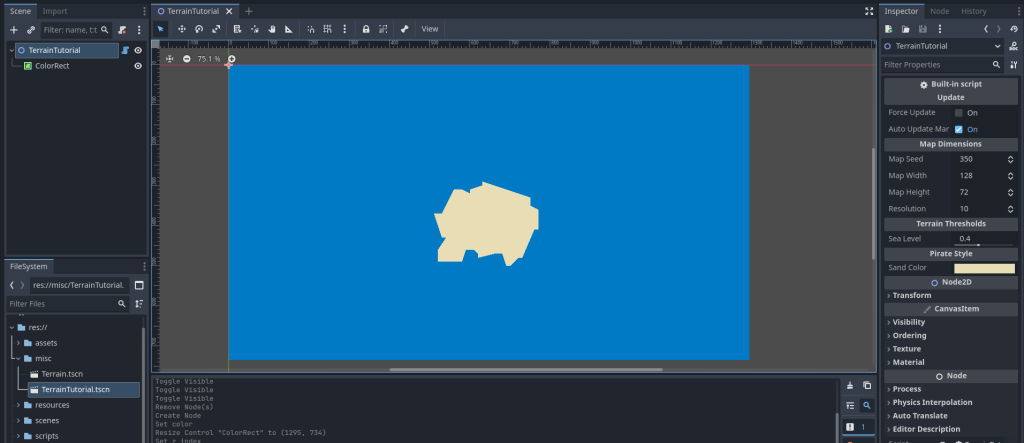
Save your code, close the scene and then reopen. You should see following:
(Note: To create quick water, make a ColorRect child of root node. Make sure to check Show Behind Parent property under Visibility in inspector.)
Making Multiple Islands (Metaballs)
Instead of forcing the island to be in the center, we will look for Marker2D nodes as children. We sum up the influence of all markers to create organic blobs that merge together (Metaballs).
Add these variables:
@export_category("Island Shape")
@export var island_radius: float = 300.0 :
    set(value): island_radius = value; _request_regen()
@export_range(0.1, 5.0) var falloff_curve: float = 0.385 :
    set(value): falloff_curve = value; _request_regen()
@export_range(0.005, 0.1) var noise_freq: float = 0.025 :
set(value): noise_freq = value; _request_regen()Update/replace generate_map:
func generate_map():
	_noise.seed = map_seed
	_noise.frequency = noise_freq # Use exported variable
	_polys_sand.clear()

	var markers = _get_marker_nodes()
	var use_default_center = markers.is_empty()

	var bm_sand = BitMap.new(); bm_sand.create(Vector2i(map_width, map_height))

	for y in range(map_height):
		for x in range(map_width):
			var pos_vec = Vector2(x * resolution, y * resolution)
			var mask_val = 0.0

			if use_default_center:
				# Old logic for fallback
				var d = Vector2(x,y).distance_to(Vector2(map_width/2.0, map_height/2.0))
				var grad = 1.0 - (d / (min(map_width, map_height) * 0.45))
				mask_val = clamp(grad, 0.0, 1.0)
			else:
				# New Metaball Logic
				for m in markers:
					var m_local = m.position
					var d = pos_vec.distance_to(m_local)
					if d < island_radius:
						var norm_dist = d / island_radius
						# (1 - x)^curve gives nice slopes
						var influence = pow(1.0 - norm_dist, falloff_curve)
						mask_val += influence

			mask_val = clamp(mask_val, 0.0, 1.5)

			var noise_val = (_noise.get_noise_2d(x, y) + 1.0) / 2.0
			var h = noise_val * mask_val

			if h > sea_level: bm_sand.set_bit(x, y, true)

	# ... (Keep the Polygon conversion part from Step 1 below same) ...
	var raw_polys = bm_sand.opaque_to_polygons(Rect2i(0, 0, map_width, map_height), 1.0)
	for r in raw_polys:
		var scaled = PackedVector2Array()
		for p in r: scaled.append(p * resolution)
		_polys_sand.append(scaled)

queue_redraw()Earlier, we calculated gradient falloff from center of screen. But now, we loop and calculate gradient centered at each Marker2D node’s position. We combine/add the influence of all those gradients together. So our elevation gets higher the more we get closer to any Marker2D node position.
Save and run your code. You should see something similar to this (make sure you have Marker2D nodes set-up as shown in image left side):
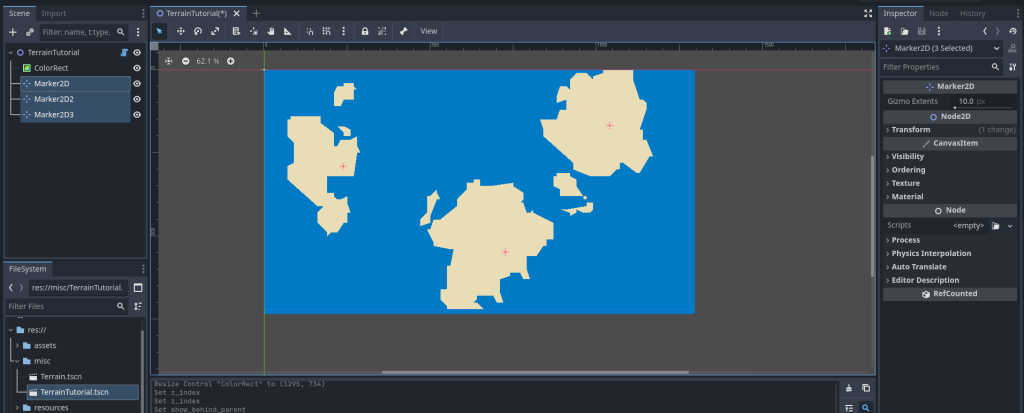
Marker2D nodes. We can make custom-shaped landmasses this way.Adding Multiple Biomes & Layers
We need more than just sand. We need shallow water, grass, mountains, and snow. We will compute all these layers in the same loop.
Add these variables:
@export_range(0.0, 1.0) var grass_start: float = 0.5 :
    set(value): grass_start = value; _request_regen()
@export_range(0.0, 1.0) var mountain_start: float = 0.7 :
    set(value): mountain_start = value; _request_regen()

@export var shallow_color: Color = Color("4fa4b8")
@export var grass_color: Color = Color("8ab068")
@export var mountain_color: Color = Color("8c969c")
@export var snow_color: Color = Color("d3f4fa")
@export var paper_color: Color = Color("2b6d82") : # Background
    set(value): paper_color = value; _request_regen()

var _polys_shallow: Array = []
var _polys_grass: Array = []
var _polys_mountain: Array = []
var _polys_snow: Array = []Refactor generate_map to handle multiple bitmaps:
We will move the “Bitmap to Polygon” logic into a helper function _process_bitmap to avoid code duplication.
func generate_map():
    _noise.seed = map_seed
    _noise.frequency = noise_freq

    # Clear all
    _polys_shallow.clear(); _polys_sand.clear(); _polys_grass.clear()
    _polys_mountain.clear(); _polys_snow.clear()

    var markers = _get_marker_nodes()
    var use_default_center = markers.is_empty()

    # Create BitMaps
    var bm_shallow = BitMap.new(); bm_shallow.create(Vector2i(map_width, map_height))
    var bm_sand = BitMap.new(); bm_sand.create(Vector2i(map_width, map_height))
    var bm_grass = BitMap.new(); bm_grass.create(Vector2i(map_width, map_height))
    var bm_mnt = BitMap.new(); bm_mnt.create(Vector2i(map_width, map_height))
    var bm_snow = BitMap.new(); bm_snow.create(Vector2i(map_width, map_height))

    for y in range(map_height):
        for x in range(map_width):
            var pos_vec = Vector2(x * resolution, y * resolution)
            var mask_val = 0.0

            if use_default_center:
                var d = Vector2(x,y).distance_to(Vector2(map_width/2.0, map_height/2.0))
                var grad = 1.0 - (d / (min(map_width, map_height) * 0.45))
                mask_val = clamp(grad, 0.0, 1.0)
            else:
                for m in markers:
                    var m_local = m.position
                    var d = pos_vec.distance_to(m_local)
                    if d < island_radius:
                        var norm_dist = d / island_radius
                        mask_val += pow(1.0 - norm_dist, falloff_curve)

            mask_val = clamp(mask_val, 0.0, 1.5)
            var noise_val = (_noise.get_noise_2d(x, y) + 1.0) / 2.0
            var h = noise_val * mask_val

            # Fill BitMaps based on height
            if h > sea_level - 0.05: bm_shallow.set_bit(x, y, true)
            if h > sea_level: bm_sand.set_bit(x, y, true)
            if h > grass_start: bm_grass.set_bit(x, y, true)
            if h > mountain_start: bm_mnt.set_bit(x, y, true)
            if h > mountain_start + 0.15: bm_snow.set_bit(x, y, true)

    # Convert all layers
    _polys_shallow = _process_bitmap(bm_shallow)
    _polys_sand = _process_bitmap(bm_sand)
    _polys_grass = _process_bitmap(bm_grass)
    _polys_mountain = _process_bitmap(bm_mnt)
    _polys_snow = _process_bitmap(bm_snow)

    queue_redraw()

func _process_bitmap(bm: BitMap) -> Array:
    var final = []
    var raw = bm.opaque_to_polygons(Rect2i(0, 0, map_width, map_height), 1.0)
    for r in raw:
        if r.size() < 4: continue
        var scaled = PackedVector2Array()
        for p in r: scaled.append(p * resolution)
        final.append(scaled)
    return final

func _draw():
    # Draw all layers in order
    var c_shall = shallow_color; c_shall.a = 0.6
    for p in _polys_shallow: draw_colored_polygon(p, c_shall)
    for p in _polys_sand: draw_colored_polygon(p, sand_color)
    for p in _polys_grass: draw_colored_polygon(p, grass_color)
    for p in _polys_mountain: draw_colored_polygon(p, mountain_color)
for p in _polys_snow: draw_colored_polygon(p, snow_color)We made multiple layers using the same logic that we used for single sand layer in above steps. We are just using multiple thresholds now, one for each layer.
Also, we are now doing the exact same “Bitmap to Polygon” conversion five times (once for each biome), therefore we move that logic into a helper function called _process_bitmap.
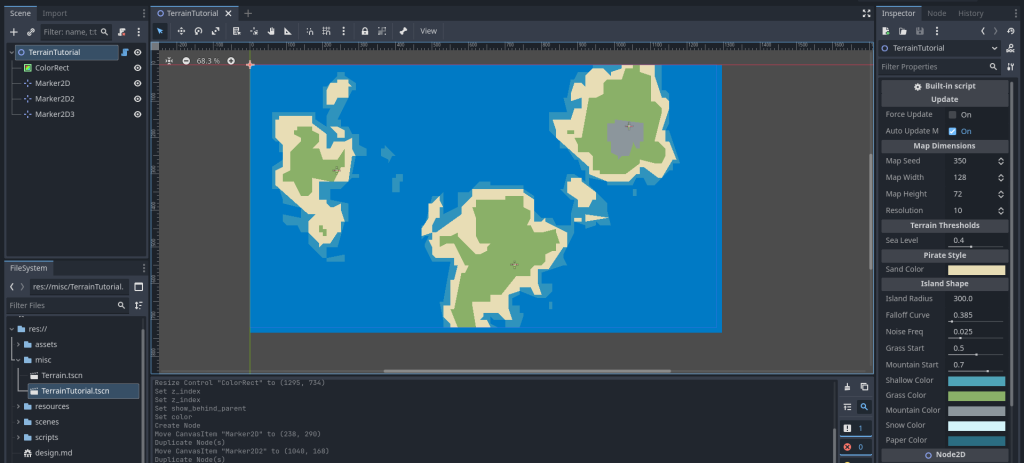
Save your script, close the scene and then reopen. You should see something like this:
Adding Outline & Hand-Drawn Smoothing
The polygons currently look like pixel blocks. We will use Chaikin’s Algorithm to smooth corners and Noise Distortion to wobble the lines to look like ink.
Add these variables:
@export var outline_color: Color = Color("1a262b")
@export var wobble_amp: float = 3.0 :
    set(value): wobble_amp = value; _request_regen()
@export var wobble_freq: float = 0.3 :
    set(value): wobble_freq = value; _request_regen()
@export_range(0, 5) var smoothness: int = 0 :
set(value): smoothness = value; _request_regen()Add Helper Functions:
_get_distortion: Calculates wobble for a point._smooth_polygon: Cuts corners iteratively._stylize_line: Adds extra points to long lines so the wobble looks detailed.
func _get_distortion(pos: Vector2) -> Vector2:
    var nx = pos.x * 0.05
    var ny = pos.y * 0.05
    var off_x = _noise.get_noise_2d(nx, ny) * wobble_amp
    var off_y = _noise.get_noise_2d(nx + 100, ny + 100) * wobble_amp
    return Vector2(off_x, off_y)

func _smooth_polygon(points: PackedVector2Array, iterations: int) -> PackedVector2Array:
    if iterations <= 0 or points.size() < 3: return points
    var current = points
    for i in range(iterations):
        var next_pts = PackedVector2Array()
        for j in range(current.size()):
            var p0 = current[j]
            var p1 = current[(j + 1) % current.size()]
            # Chaikin cuts: 25% and 75% along the edge
            next_pts.append(p0.lerp(p1, 0.25))
            next_pts.append(p0.lerp(p1, 0.75))
        current = next_pts
    return current

func _stylize_line(points: PackedVector2Array) -> PackedVector2Array:
    var result = PackedVector2Array()
    var seg_len = 10.0 / clamp(wobble_freq, 0.01, 1.0)

    for i in range(points.size()):
        var p1 = points[i]
        var p2 = points[(i + 1) % points.size()]
        var dist = p1.distance_to(p2)
        var steps = max(1, int(dist / seg_len))

        for s in range(steps):
            var t = float(s) / steps
            var base = p1.lerp(p2, t)
            result.append(base + _get_distortion(base))
return resultUpdate _process_bitmap:
Now we apply these effects when processing the bitmap.
func _process_bitmap(bm: BitMap) -> Array:
    var final = []
    var raw = bm.opaque_to_polygons(Rect2i(0, 0, map_width, map_height), 1.0)
    for r in raw:
        if r.size() < 4: continue
        var scaled = PackedVector2Array()
        for p in r: scaled.append(p * resolution)

        # 1. Stylize (Wobble)
        var stylized = _stylize_line(scaled)

        # 2. Smooth (Chaikin)
        stylized = _smooth_polygon(stylized, smoothness)

        # 3. Clean (Fix self-intersections caused by wobble)
        var cleaned_polys = Geometry2D.merge_polygons(stylized, PackedVector2Array())

        for poly in cleaned_polys:
            if poly.size() >= 3:
                final.append(poly)
return finalUpdate _draw to add outline:
Add an outline boolean logic to a helper lambda.
func _draw():
    var size_px = Vector2(map_width * resolution, map_height * resolution)
    draw_rect(Rect2(Vector2.ZERO, size_px), outline_color, false, 2.0)

    var draw_l = func(polys, col, outline):
        for p in polys:
            draw_colored_polygon(p, col)
            if outline and not p.is_empty():
                var p_closed = p.duplicate()
                p_closed.append(p[0])
                draw_polyline(p_closed, outline_color, 1.5, true)

    var c_shall = shallow_color; c_shall.a = 0.6
    draw_l.call(_polys_shallow, c_shall, false)
    draw_l.call(_polys_sand, sand_color, true) # Outline only on sand
    draw_l.call(_polys_grass, grass_color, false)
    draw_l.call(_polys_mountain, mountain_color, false)
    draw_l.call(_polys_snow, snow_color, false)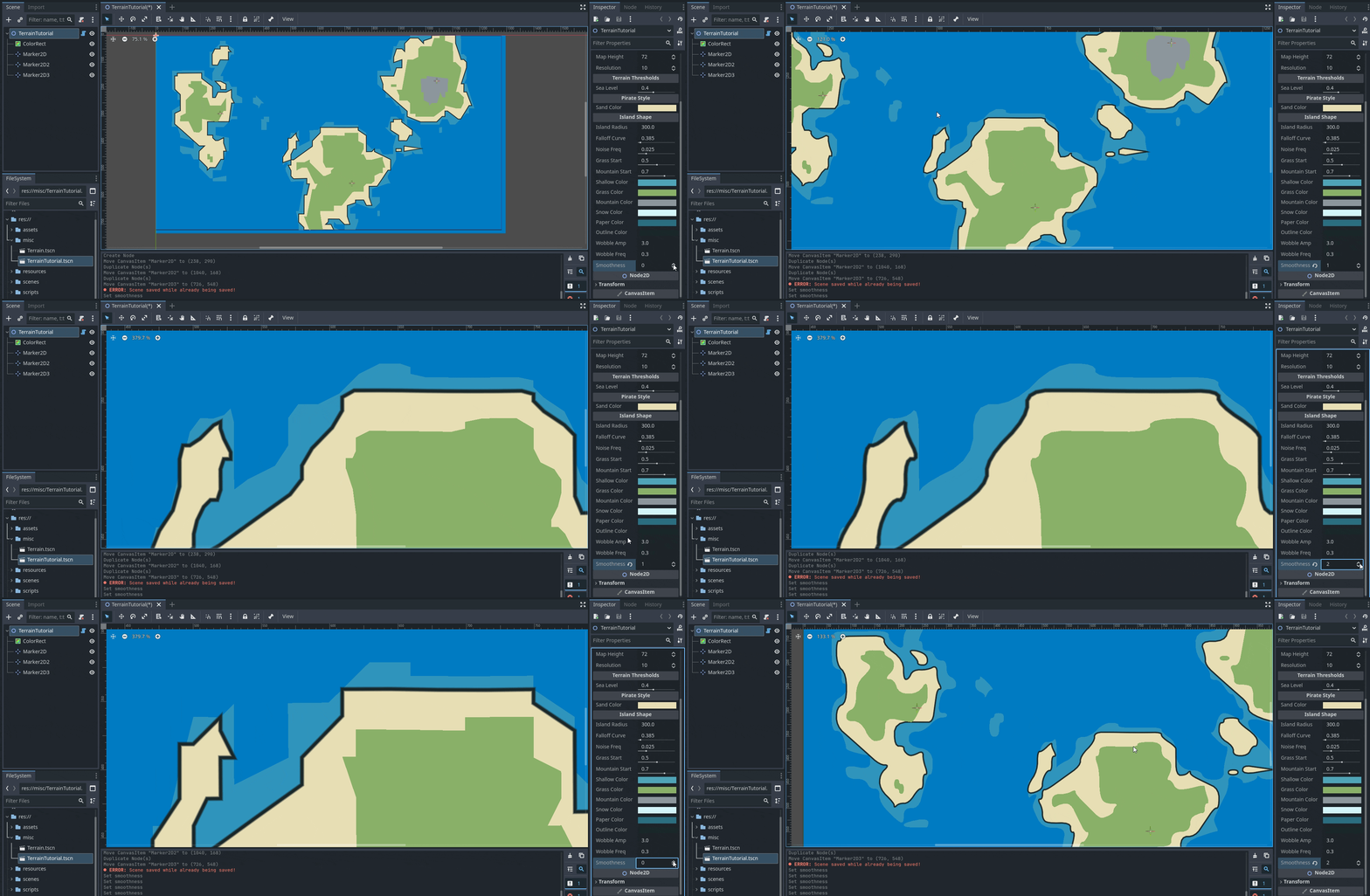
Simple Placeholder Props
We need to scatter items based on height (mountains) and “Moisture” (forests vs ruins). We need a second noise map for moisture.
Add Variables & Enum:
var _moist_noise: FastNoiseLite
var _props: Array = []

enum PropType { NONE, PALM, PINE, MT_SMALL, RUINS }

# In _init_noise(), add this:
# _moist_noise = FastNoiseLite.new()
# _moist_noise.frequency = 0.02Update generate_map to save raw data and call props:
We need the raw height data available after the loop to decide where to put props.
func generate_map():
    # ... (Previous setup) ...
    _moist_noise.seed = map_seed + 100
    _rng.seed = map_seed
    _props.clear()

    var raw_h = [] # Store height
    raw_h.resize(map_width * map_height)
    var raw_m = [] # Store moisture
    raw_m.resize(map_width * map_height)

    # ... (Inside the x/y loop) ...
            # ... (After calculating h) ...

            var m_val = _moist_noise.get_noise_2d(x*2, y*2)

            raw_h[y * map_width + x] = h
            raw_m[y * map_width + x] = m_val

            # ... (BitMap checks remain here) ...

    # ... (Process bitmaps remains here) ...

    # Generate Props
    _generate_props(raw_h, raw_m)
    queue_redraw()

func _generate_props(h_data, m_data):
    var step = 2
    for y in range(0, map_height, step):
        for x in range(0, map_width, step):
            var idx = y * map_width + x
            var h = h_data[idx]
            var m = m_data[idx]

            if h <= sea_level: continue

            var type = PropType.NONE
            var world_pos = Vector2(x * resolution, y * resolution)

            if world_pos.x <= 0 or world_pos.x >= map_width*resolution: continue
            if world_pos.y <= 0 or world_pos.y >= map_height*resolution: continue

            # Jitter
            world_pos += Vector2(_rng.randf_range(-4, 4), _rng.randf_range(-4, 4))
            world_pos += _get_distortion(world_pos)

            if h > mountain_start:
                if h < mountain_start + 0.15 and _rng.randf() > 0.8:
                    type = PropType.MT_SMALL
            elif h > grass_start:
                if m > 0.1 and _rng.randf() > 0.6: type = PropType.PINE
                elif m < -0.2 and _rng.randf() > 0.95: type = PropType.RUINS
                elif _rng.randf() > 0.92: type = PropType.PALM
            else:
                if _rng.randf() > 0.92: type = PropType.PALM

            if type != PropType.NONE:
                _props.append({ "type": type, "pos": world_pos, "scale": _rng.randf_range(0.8, 1.2) })

_props.sort_custom(func(a,b): return a.pos.y < b.pos.y) # Y-SortAdd _draw_prop placeholder function so we see something:
Update _draw to loop over props at the end.
func _draw():
    # ... (Previous layers) ...
    for p in _props: _draw_prop(p)

func _draw_prop(p):
    # Placeholder: Simple color-coded triangles
    var col = Color.MAGENTA
    if p.type == PropType.PALM: col = Color.LIGHT_GREEN
    if p.type == PropType.PINE: col = Color.DARK_GREEN
    if p.type == PropType.MT_SMALL: col = Color.GRAY

    draw_circle(p.pos, 3, col)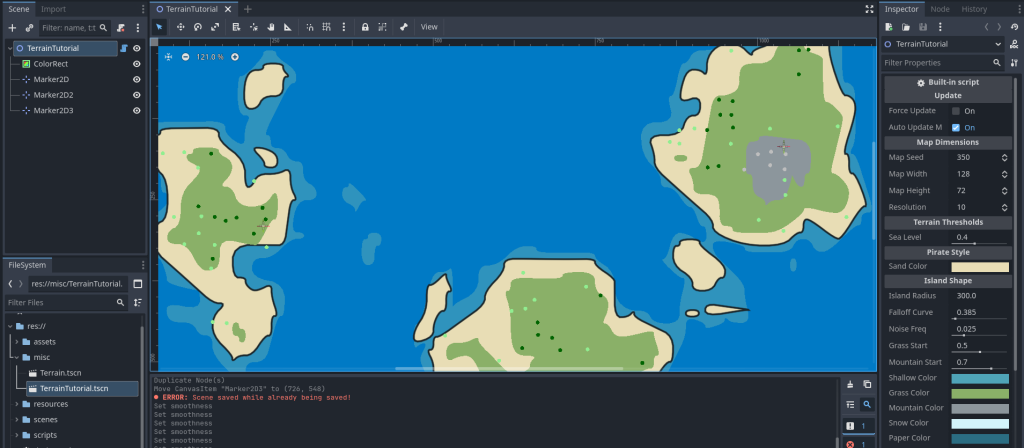
Replace Circles with Real Shapes
Finally, replace the placeholder _draw_prop with specific logic to draw palm trees, pines, and mountains using draw_line and draw_polyline to fit the ink style.
Replace _draw_prop with this:
func _draw_prop(p):
    var pos = p.pos
    var s = p.scale * (resolution * 0.1)

    match p.type:
        PropType.PALM:
            var top = pos + Vector2(2, -10 * s)
            draw_line(pos, top, outline_color, 1.5)
            for i in range(5):
                var ang = i * PI * 0.4
                draw_line(top, top + Vector2(cos(ang), sin(ang)) * (6*s), outline_color, 1.0)
        PropType.PINE:
            var top = pos + Vector2(0, -12 * s)
            var w = 4 * s
            var pts = [pos + Vector2(-w, -2*s), top, pos + Vector2(w, -2*s)]
            draw_colored_polygon(PackedVector2Array(pts), grass_color.darkened(0.2))

            var pts_closed = PackedVector2Array(pts)
            pts_closed.append(pts[0])
            draw_polyline(pts_closed, outline_color, 1.2)

            draw_line(pos, pos + Vector2(0, -2*s), outline_color, 2.0)
        PropType.MT_SMALL:
            var h = 8 * s
            var w = 6 * s
            var pts = [pos + Vector2(-w, 0), pos + Vector2(0, -h), pos + Vector2(w, 0)]
            draw_colored_polygon(PackedVector2Array(pts), mountain_color.darkened(0.1))

            var pts_closed = PackedVector2Array(pts)
            pts_closed.append(pts[0])
            draw_polyline(pts_closed, outline_color, 1.5)

            draw_line(pts[1], pts[1] + Vector2(2, 4), outline_color, 1.0)
        PropType.RUINS:
            var w = 3 * s; var h = 5 * s
            var r = Rect2(pos + Vector2(-w, -h), Vector2(w, h))
            draw_rect(r, mountain_color.darkened(0.2), true)
            draw_rect(r, outline_color, false, 1.2)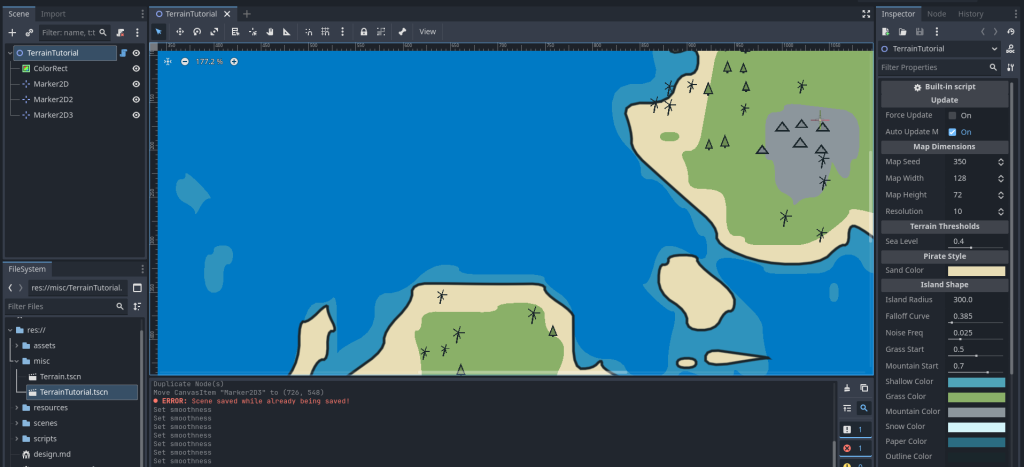
Sprite2D nodes instead of procedural shapes.The Ocean Shader (Bonus)
In the ColorRect node we used for water, add a ShaderMaterial under materials section. And create a shader and paste following code:
shader_type canvas_item;

// --- Colors ---
uniform vec4 bg_color : source_color = vec4(0.0, 0.4, 0.85, 1.0);
uniform vec4 wave_color : source_color = vec4(1.0, 1.0, 1.0, 1.0);

// --- Settings ---
// Controls how many V's appear (0.0 = none, 1.0 = everywhere)
uniform float density : hint_range(0.0, 1.0) = 0.1;

// Controls the speed of the animation cycle
uniform float speed : hint_range(0.1, 2.0) = 0.5;

// High default scale to make waves look small
uniform vec2 wave_scale = vec2(80.0, 40.0);

uniform float wave_thickness : hint_range(0.01, 0.2) = 0.05;
uniform float wave_height : hint_range(0.0, 1.0) = 0.3;

// Pseudo-random number generator
float random(vec2 uv) {
    return fract(sin(dot(uv.xy, vec2(12.9898, 78.233))) * 43758.5453123);
}

float inverted_v_wave(vec2 uv, float time_offset) {
    vec2 id = floor(uv);          // Integer ID of the cell
    vec2 f = fract(uv) - 0.5;     // Local coordinates

    // Calculate a random value for this cell
    // We add floor(TIME) to the ID so the "active" cells change location over time
    float r = random(id + floor(TIME * speed * 0.2) + time_offset);

    // --- DENSITY CHECK ---
    // If the random value is higher than our density setting, do not draw this wave.
    if (r > density) {
        return 0.0;
    }

    // --- ANIMATION ---
    // Make the cycle unique per cell so they don't pulse in unison
    float t = TIME * speed + r * 10.0;
    float cycle = fract(t);

    // Opacity: Fades in and out (0 -> 1 -> 0)
    float opacity = sin(cycle * 3.14159);

    // Movement: Slide slightly upward while fading
    float slide = (cycle - 0.5) * 0.3;
    vec2 p = f;
    p.y += slide;

    // --- SHAPE: Inverted V ( /\ ) ---
    float slope = 2.5; // Controls how wide the V is
    float v_shape = abs(p.y - abs(p.x) * slope + wave_height);

    // Draw the line
    float line = smoothstep(wave_thickness, wave_thickness - 0.02, v_shape);

    // Mask the sides so it doesn't touch cell borders
    float mask = smoothstep(0.5, 0.2, abs(p.x));

    return line * mask * opacity;
}

void fragment() {
    vec2 uv = UV * wave_scale;

    float waves = 0.0;

    // Layer 1
    waves += inverted_v_wave(uv, 0.0);

    // Layer 2 (Offset by half a cell to fill gaps)
    waves += inverted_v_wave(uv + vec2(0.5, 0.5), 13.0);

    vec3 final_color = mix(bg_color.rgb, wave_color.rgb, clamp(waves, 0.0, 1.0));
    COLOR = vec4(final_color, 1.0);
}Thats all. You have achieved a stylized pirate map procedurally. You can proceed to 2D path finding navigation on this map.
Thank you so much for reading <3